








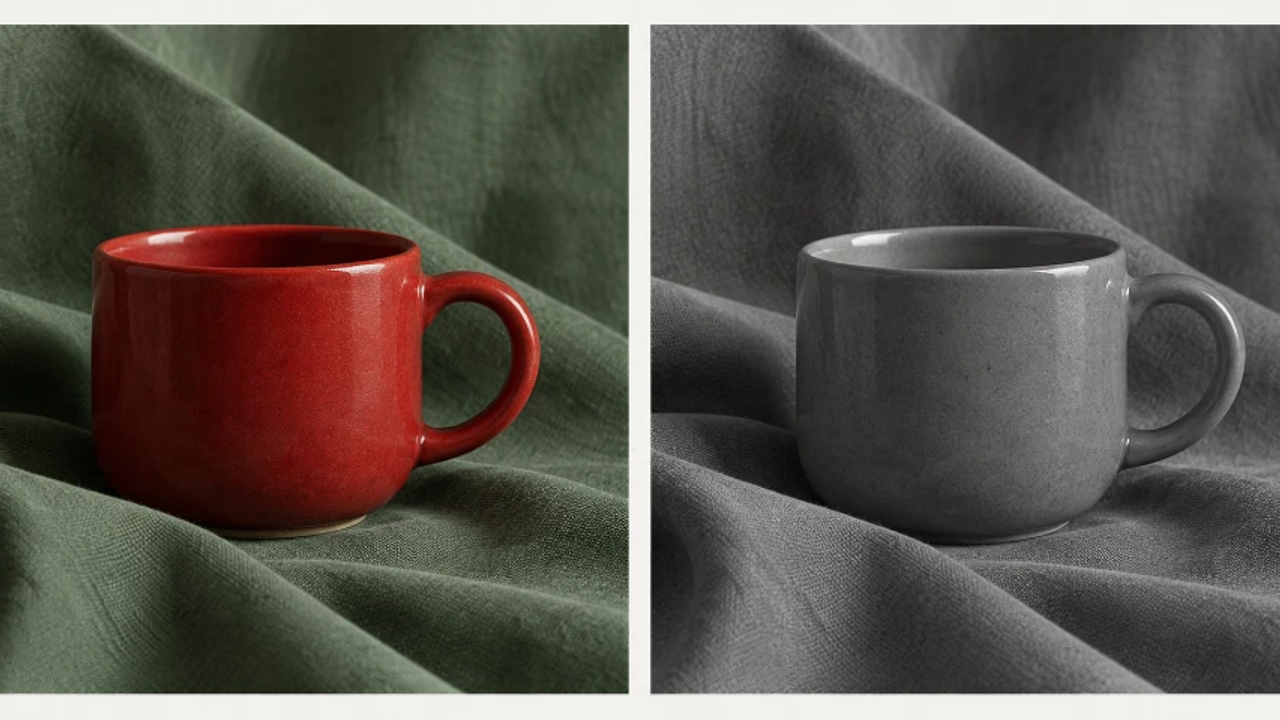
An AI Photo Editor can help explore another treatment, but removing colour is only the beginning of the decision. For someone comparing pic editor AI options, the useful question is whether the subject's important boundaries survive. A striking monochrome image may still lose the particular shape the photograph was meant to show.
Find the Boundary That Colour Was Keeping Visible
Start with the original photograph and identify the edge that matters. In a hypothetical still life, the cup's handle may be important to its character, while a soft fold in the background cloth is incidental. That distinction gives the review a priority. The goal is not maximum contrast everywhere. It is enough separation for the intended form to remain understandable.
Before using an AI Photo Editor, check which parts of that edge rely mostly on colour. The handle may remain visible against a dark patch but merge against a lighter fold. The issue can vary around the same object. A general judgment that the cup looks clear will miss a short section that is essential to reading its shape.
PicEditor AI accepts a source image and a written editing request. A monochrome treatment can be explored through that general picture-editing workflow, then inspected as a candidate. Do not assume a dedicated colour-removal tool does the same job: targeting a particular hue and converting an entire picture to monochrome are different requests with different consequences.
Keep an untouched source available during the comparison. A candidate may restore a strong boundary by making the handle thicker, changing its angle, or inventing an outline. That would solve visibility by altering the subject. If the photograph is meant to describe the actual cup, the shape needs to remain supported by the source rather than merely recognisable as a plausible handle.
How Colour Differences Can Become Similar Grey Values
A monochrome image represents the scene through light and dark rather than through its original colour differences. Two visually distinct coloured areas can therefore become similar grey regions. The change is especially noticeable where their texture and brightness are also close. A red cup against green cloth is a useful imaginary example because the colour distinction can feel stronger than the tonal one.
Different treatments can distribute those tones differently. A straightforward monochrome conversion in an ordinary editor can provide a baseline, while a more deliberate tonal treatment may lighten or darken selected relationships. The photographer should compare the actual results instead of assuming there is one inevitable black-and-white version of the source.
PicEditor AI can supply an alternative interpretation from an instruction describing the desired relationship. A bounded request might ask for a monochrome still life in which the cup remains distinct from the cloth while its shape and surface marks stay recognisable. This is a brief to evaluate, not a guarantee of exact tonal control or faithful preservation.
Do not confuse a brighter object with a better photograph. Strong local lightening can make the cup look detached from the scene. A dark outline can make a photographic edge look drawn. The correction needs to work with the surrounding light and surface, not simply produce the largest possible difference between the object and its background.
The intended use can change the preferred treatment. A graphic poster may welcome a more emphatic interpretation, while a descriptive image of a handmade object may need restraint. Decide which role the monochrome version will serve before judging how much tonal change is appropriate. A treatment can be effective without being suitable for every use of the photograph.
Compare the Handle and Background in the Actual Layout
Place the baseline and the candidate at the same displayed size. Begin with the important boundary rather than the overall drama of the image. Follow the handle around its curve and inspect where it meets the background. Does the shape remain readable? Has a new highlight, dark fringe, or altered contour created the appearance of separation?
Photo editor AI result can look stronger while answering the wrong question. A newly crisp outline might make the cup easier to recognise but misrepresent its actual edge. Compare that area directly with the source. If the subject has changed, choose another candidate, make a conventional adjustment, or retain the colour version.
Check small display sizes after inspecting the detail. A delicate tonal difference can disappear in a thumbnail, leaving the handle indistinct again. Conversely, a heavy correction may dominate a small image even when it feels restrained in an enlarged preview. The actual layout determines how much separation the audience will be able to use.
Distinguish a real highlight in the source from a bright rim introduced by the treatment. A reflective ceramic surface can already have a light edge, so the presence of a rim is not automatically a defect. The question is whether that rim follows evidence in the photograph or has been added mainly to separate the cup. Inspect the source at that exact location before deciding.
Look at the rest of the composition before accepting a local repair. The cloth may have become so pale that its folds disappear, or another object may now attract more attention than the cup. The image needs to hold together. A successful adjustment to one boundary should not quietly discard another feature the photographer considers important.
Ask an unfamiliar viewer to describe the cup's shape without telling them which section was difficult. This is a proposed editorial check, not a reported experiment. If they cannot follow the handle, inspect the point they found unclear. If they describe an altered shape, return to the source before making another tonal change.

Keep the comparison tied to a specific boundary rather than to an abstract preference for a cinematic look. The baseline may be calmer and more accurate; the candidate may be better suited to a graphic treatment. Either can be the right choice when the photographer can explain the role. The comparison should make that choice clearer instead of presenting contrast as a universal improvement.
Choose a Treatment That Preserves the Intended Form
PicEditor AI can help explore a monochrome direction when the source is readable and the important boundaries can be checked. It is less useful as proof that a more dramatic treatment preserves the exact appearance of the subject. Keep the source, the baseline, and the intended use visible during approval.
Choose the version in which the cup's form remains understandable at the final size without an unsupported change to its shape. If colour carries essential information that no satisfactory monochrome treatment preserves, keep the colour photograph. Compare the selected version with the intended use once more before publishing.
Bu Bir İlandır